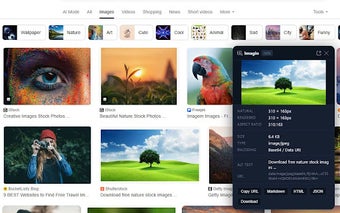
Inspect image metadata from Chrome's context menu
Imagio - View Image Properties, from imagio.app, is a Chrome extension that inspects image metadata directly in the browser. It opens a small data panel from the right-click menu to show dimensions, file size, MIME type, EXIF fields and GPS tags without downloading files. The extension targets web developers, photographers, graphic designers and digital marketers who need quick verification of image technical details during browsing and quality-control workflows. It is available for Chromium-based desktop browsers and requires no account to operate.
How Imagio surfaces image details without saving files
Right-click integration provides immediate access to a compact reader panel, so inspectors do not need to download images or open external tools. The panel shows the direct source URL, pixel dimensions, reported file size and MIME type for standard web formats such as JPEG, PNG and WebP. This on-page access supports single-image checks during review or debugging tasks where saving every file is impractical.
How deeply it reads photographic metadata
The extension extracts embedded EXIF fields when present, revealing camera model, aperture, shutter speed, ISO and timestamp data as available. It also surfaces GPS coordinates and location tags if embedded in the file, a level of metadata visibility that exceeds what the browser's Inspect element normally exposes. That makes the tool useful for photographers and developers who need provenance or technical capture details without separate utilities.
How it behaves in normal browsing and resource use
Imagio is described as lightweight and runs analysis locally inside the browser, so it does not require an external account or server-side processing. Because it parses headers and embedded metadata on demand, the extension adds minimal overhead to browsing sessions while letting users check individual images quickly. This local operation also reduces the need to send image files to third-party services for inspection.
Who benefits from the extension and where it falls short
The tool targets web developers, designers, photographers and digital marketers who verify image specs during editorial or QA workflows, and it runs on Chrome and other Chromium-based desktop browsers. It does not extract data from images that lack EXIF metadata or from images protected by security scripts and certain Canvas-based embeds, so some in-page graphics remain outside its reach.
A practical, narrowly focused utility for professionals
Imagio is a practical option for professionals who conduct in-browser verification of image technical details and photographic metadata, because it operates locally and is maintained by a team focused on media utilities. The trade-off is limited coverage for protected or script-generated images. Tip: add a short test pass across representative pages before relying on it for batch audits to identify any protected or Canvas-embedded images beforehand.